Caring for a Three Legged Dog or Cat
Tripawds is your home to learn how to care for a three legged dog or cat, with answers about dog leg amputation, and cat amputation recovery from many years of member experiences.
Join The Tripawds Community
Learn how to help three legged dogs and cats in the forums below. Browse and search as a guest or register for free and get full member benefits:
Instant post approval.
Private messages to members.
Subscribe to favorite topics.
Live Chat and much more!


 Register
 Log In
 Members

 Add Topic


I still don't get how to add a photo. I am participating in discussion forums but have not started a blog and probably will not. any suggestions?

 Offline


NOTE FOR MOBILE DEVICE USERS.
Instructions are now the same as on desktop browsers, IF the Rich Text Editor is selected in your Forums Profile (On by default). If all else fails, paste the URL of the (hosted) photo in your Forum post and we’ll take care of that for you. Better yet, start a free blog to upload your photos.
IF YOU'RE ON A LAPTOP OR DESKTOP . . .
Let's see if we can help…
Do you share photos anywhere online? Images must be hosted somewhere for you to embed them in a forum post. If you have a Flickr, SnapFish or other online photo gallery account – or another personal/business website – upload your photos there first.
If you do not have anywhere to upload pictures, the easiest thing would be to start a blog. You do not need to use the blog for writing posts, but it will provide you with a Media Gallery for uploading photos. Visit the Media -> Add New tab in your blog dashboard to upload them. Be sure to resize the images first so you do not quickly consume your free upload space quota.
Once you have the photos uploaded somewhere online:
- Copy the image file location, also known as the image URL. (This is readily available in your blog Media Library for all images, or you can right click on an image to copy its location.)
- Start your forum topic (add topic), or draft your topic reply (post reply).
- Click the small Insert/Edit Image button that appears in your post editing tool bar (the small mountain & sun icon, 6th from right).
- Paste the photo's file location that you copied into the Image URL Field, and click insert.
- The image will appear in your post.
Hope this helps. Please feel free reply to this topic with any further questions.
UPDATE February, 2020:
- Copying a photo directly from your blog post (or Media Library) and pasting into a forum post should work in most cases.
- If not, copy the Image URL and paste that on a line by itself and the photo will auto-embed
(Get link from Media Library, or right click on photo and Copy Image Location) - See below for updated instructions to embed photos from Instagram or Facebook
How to embed photos and videos from Instagram
How to Add Photos from Facebook
Tripawds Founders Jim and Rene
tripawds.com | tripawds.org | bemoredog.net | triday.pet

Oh jeepers. I'm gonna need help. I know it's easy, but my brain is not getting it. Will try the blog thing after I talk to my mac pros. Wish me luck.
We're happy to help, feel free to PM us and we can schedule a time to walk you through it in the chat room .
Being on a Mac or PC does not matter. Photos just need to be hosted somewhere online so you can paste in the Image URL when using the Insert Image button (the one with the small tree) in your forum post editor. We offer free Tripawds Blogs for those who do not already share pictures online somewhere.
Tripawds Founders Jim and Rene
tripawds.com | tripawds.org | bemoredog.net | triday.pet

I personally use photobucket.com but there's many other ones. I haven't tried the other ones but my guess is that they work just about the same. I have been with photobucket for numerous years now and I have no issues. Did I mentioned I'm computer challenged?
Dogs: Friends for life, faithful and true.
Courage is being scared to death... but saddling up anyways.- John Wayne
bikeintime.wordpress.com (will soon have Hank story)


"Click the small Insert/Edit Image button (the small tree icon)."
I for the life of me cannot locate the button you describe above. I have gone to my profile settings to ensure that I have Rich Text enabled and I do. Help please.
Adelaide is a young tripawd Husky, from an injury. Her amp was on 10/1/12. She has 4 sisters, Aissa (a senior border collie/chow), Maggie May (a puppy Great Pyrenees), Mathilde and Morrigan and 1 baby brother, Bagheera. We are all watched over by our angel Brendol, who was dx with OSA 1/30/13, amp on 2/6/13, and left us on 8/20/13.


You can read their stories at http://adelaide.tripawds.com and http://brendol.tripawds.com
Hi Karma,
The tree icon is above the arrow:
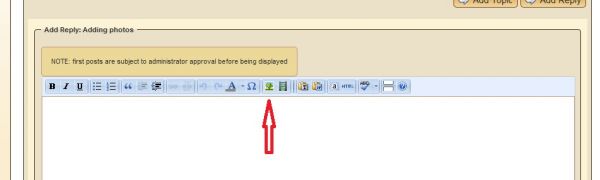

If you are not seeing the toolbar you need to talk with admin guy. Unless you are on a mobile device- I don't get the tool bar on my iPad.
Hope this helps.
Karen
Karma said
I for the life of me cannot locate the button you describe above.
You will not see the editing tools on a mobile device. Are you using an iPad or your phone, by chance? The text-only editor is delivered to mobile devices due to unreliable compatibility across all platforms.
By selecting Rich Text as your default editor, you will always have the TinyMCE editor when using a desktop computer or laptop. You will still, however, get the text editor on any mobile device. If you are on an iPad, try just pasting the Image URL (image file location) on a line by itself in your post. If the image does not auto-embed (depending on its source) we can then embed it for you, or readers can click it to view the photo in a new window.
If you are indeed using Windows or Mac OS, let us know what browser you are using and send a PM with your username and password so we can log in as you and try to replicate the issue.
Hope this helps!
Tripawds Founders Jim and Rene
tripawds.com | tripawds.org | bemoredog.net | triday.pet
Aha, it's the browser. I'm at home right now and I can see the toolbar. But when I'm at work it's not there. I think my work machine is on IE8.
Adelaide is a young tripawd Husky, from an injury. Her amp was on 10/1/12. She has 4 sisters, Aissa (a senior border collie/chow), Maggie May (a puppy Great Pyrenees), Mathilde and Morrigan and 1 baby brother, Bagheera. We are all watched over by our angel Brendol, who was dx with OSA 1/30/13, amp on 2/6/13, and left us on 8/20/13.
You can read their stories at http://adelaide.tripawds.com and http://brendol.tripawds.com
Karma said
I think my work machine is on IE8.
That would explain a lot, Internet Exploder has a mind of it's own. When encountering any issues with IE 8, try viewing the site in Compatibility View, or turning that off if already enabled.
Tripawds Founders Jim and Rene
tripawds.com | tripawds.org | bemoredog.net | triday.pet

I have tried several times to upload a picture to my profile. Every time it says there was an error. I do not have a blog, and actually I don't even know what a blog is. I just want to upload a picture of my dog to my profile. Why won't it work?
Thanks, Mike


HA! Had to laugh. Whenever I see a question about doing photos, I pop over with the slim.......really, really slim.......hope that ' be able to figure out how to post a picture someday! That's been over four months now and I still have to have email my pictures in (which I also just learned how to do!) and someone posts it for me!!
You've come to the right spot......someone will hop on and shown you how.
I look forward to photos of Willow! So glad she's home!
Sally and Happy Hannah
Happy Hannah had a glorious additional bonus time of over one yr & two months after amp for osteo! She made me laugh everyday! Joined April's Angels after send off meal of steak, ice cream, M&Ms & deer poop!
mike1967 said
I have tried several times to upload a picture to my profile.... Why won't it work?
Sorry for the inconvenience Mike. Assuming you are referring to uploading your User Avatar, we believe we have fixed the issue. Thanks for bringing it to our attention. Please try again.
If problems persist, please provide as much detail as possible about any errors you receive by copying and pasting the message or providing a screen shot.
Thank you!
Tripawds Founders Jim and Rene
tripawds.com | tripawds.org | bemoredog.net | triday.pet

admin said
OK. Let's see if we can help…Do you share photos anywhere online?
Jerry, how about DROPBOX. Does that qualify? I know it gives you access to files or folders, but I don't know if it generates URLs.
Thanks, Raven's Pack
raven said
Jerry, how about DROPBOX. Does that qualify?
Sure! As long as the images are publicly viewable. View the image in your browser, then right click on it to copy the file location (Image URL). If it ends in .jpg and does not require a user to be logged in to view it, then copy that and paste it in the Image URL field. Hope that helps!
Tripawds Founders Jim and Rene
tripawds.com | tripawds.org | bemoredog.net | triday.pet


1 Guest(s)
