Tripawds Three Legged Dog & Cat Forum Archives
Tripawds is your home to learn how to care for a three legged dog or cat. Explore 17+ years of forum archives for stories and answers to questions about dog leg amputation, and cat amputation recovery. Enjoy fresh discussion and connect with members in the new Tripawds Support Circle.
Join The Tripawds Community
Register your free account to join the Tripawds Support Circle. Connecting with members and getting the support you need is now easier than ever with the Circle app!
✅ Easy Photo Upload
✅ Direct Messaging
✅ Subscribe to Topics.
✅ Live Chat and much more!

Forums Locked: Search archives for answers & join Tripawds Support Circle to keep discussion going!
FOR BEST RESULTS: USE ADVANCED SEARCH

 Log In
 Members


3:43 pm

Team Tripawds
Administrators
24 September 2009
 Offline


Update: You cannot upload images directly to the Tripawd Forums. You can however, easily embed images that are hosted anywhere else online. Photos can be uploaded to all Tripawds Blogs , so if you do not have your photos on an online sharing site, upload them to your blog and follow these instructions to embed them here in the forums.
Facebook and Photobucket users, you may find some helpful instructions here too.
To display the Post Editor, click "Add a New Topic" or "Reply to Post".
You will then see a text field to enter your topic name and a large box for writing your entry. At the top of this box are buttons for styling text and adding photos …
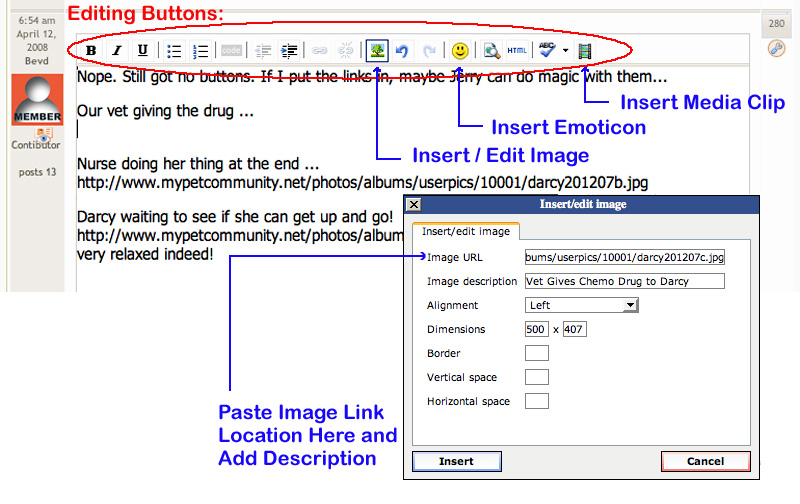

The button with the small tree will open the window shown, allowing you to enter the location of any image hosted online. Add a description, click "Insert" and your image will appear in the editor. You can then select the image and drag the corner to resize it …
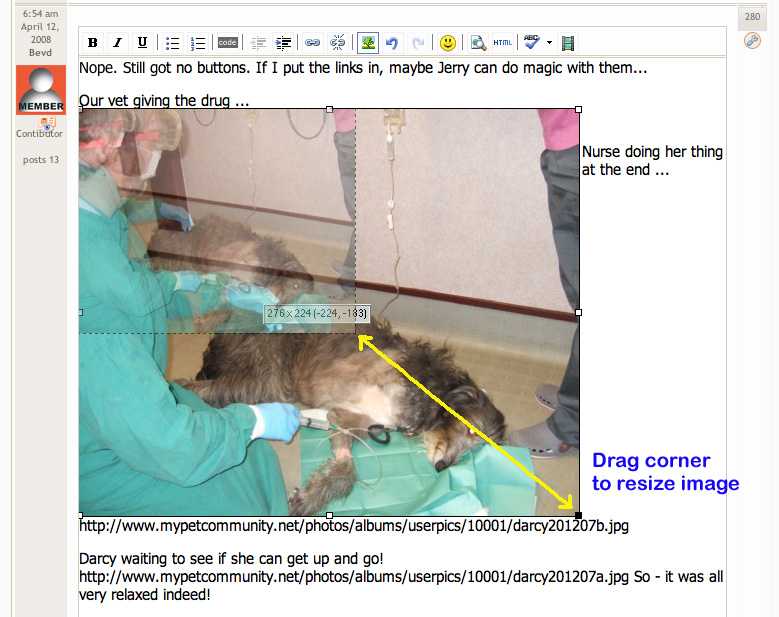
NOTE: Please size your images no larger than 500± pixels wide to maintain proper layout of the forums.
EDIT: The screenshot images shown at left are from an earlier version of the forums, but they are similar and the instructions remain the same.
Step by Step Instructions:
- Optimize your image for web display, 400×300 should suffice.
- Upload your photo to your blog or other online photo sharing site.
- Right click the image and "Copy Image Location" for the photo.
- Draft your forum post and place cursor where you want photo embedded.
- Select Insert/edit image button.
- Paste Image URL and add description.
- Click Insert.
- Resize image as desired.
- Save post.
NOTE: If the Insert/Edit Image tool icon does not appear when drafting forum posts or replies, set your default post editor to Rich Text (Tiny MCE).
Tripawds Founders Jim and Rene
tripawds.com | tripawds.org | bemoredog.net | triday.pet
7:31 am

2 February 2008
Offline
Jerry - when I was trying to add my pics to the chemo thread, there were no buttons showing in that top line at all, so no tree to click on. It happened twice. I can see all the buttons now, in this reply box, but they didn't appear in the chemo thread.
Darcy – tripawd since 16th October 2007.
***Darcy would love to be your friend on Facebook - just search for Darcy Deerhound***
7:40 pm
Team Tripawds
Administrators
24 September 2009
Offline
Hmmmm ... darn gremlins! 
Hopefully this was a glitch. Let us know if the issue continues in other threads or when you start a new topic. And I'll have my people ask around on the SimpleForum forums.
If it does happen again, please report back with your operating system, the browser you use, and whether or not you were logged in at the time.
Thanks!
Tripawds Founders Jim and Rene
tripawds.com | tripawds.org | bemoredog.net | triday.pet
10:35 am
2 February 2008
Offline
OK - will do 
Darcy – tripawd since 16th October 2007.
***Darcy would love to be your friend on Facebook - just search for Darcy Deerhound***

Hey Jerry, I have all the icons on the top and I see the tree to insert/edit an image but what if your photo is not online? What if your photo is stored in "My Pictures" in Word. I tried to copy and paste but it did not work. I tried to right click on the tree above and Go to my Pictures but from there it will not let me bring them on. I will keep trying to make sure that I can send all of you a picture of my beutiful self. Kellie
Kellie
7:42 pm
Team Tripawds
Administrators
24 September 2009
Offline
Kellie said:
...what if your photo is not online? What if your photo is stored in "My Pictures"...
To insert a photo into a forum post here, you have two options:
- The image file must be hosted somewhere online so you can use the "insert/edit image" button in the post editor. This button will not work for images that reside on your local hard drive.
- Send us the image and we can add it to the Tripawd Pals gallery. You can then visit the gallery and copy the image location (click on thumbnail to view photo at full-size , then right-click on it). Then you can paste that image link using the "insert/edit image" button.
Or, just send the photo and ask my people to add it to your post. I guess that makes three options.
Tripawds Founders Jim and Rene
tripawds.com | tripawds.org | bemoredog.net | triday.pet
Thank Jerry for all the options. I will keep trying and see how I can send Kellie's picture.
Kellie

My Mom is also having problems sending my beautiful picture. Can I email it to? If so, what address?
Charlie, my mom click on the link above that Jerry gave us and sent my photos to his email. It is jerry at tripawds dot com.
It may be next week before we see them (as Jerry is on his way to NM for his checkup) and then everyone can meet us. Sleep well.
Kellie
12:08 am
Team Tripawds
Administrators
24 September 2009
Offline
Charlie Brown said:
My Mom is also having problems ...
What type of problems? Please let us know what happened if you were unable to upload a photo using our contact form.
Tripawds Founders Jim and Rene
tripawds.com | tripawds.org | bemoredog.net | triday.pet
Jerry my pawrents love you and your pawrents forever. You posted my picture and we want to thank you soooo much. As you can tell from the one pre amputation surgery my Mom had me in all my "future" gear. Thanks to you and this site my pawrents had a chance to have a headstart with me and I think that is why I am doing so good. I sure hope that lots and lots of pawrents and pets get the same chance we did. LUV YA!!!!
P.S. Looking forward to meeting Charlie....
Kellie

ok, I tried linking a word in my post to my blog URL and it links back to your store Jerry...now what? this happened yesterday as well.
this is the page I want you all to see:
micki z.
11:41 pm
Team Tripawds
Administrators
24 September 2009
Offline
micki z said:
ok, I tried linking a word in my post to my blog URL and it links back to your store Jerry…now what?
I fixed that link in your other post for you. The URL you referenced above was not the one in the link field. How our store page got there is beyond me. Be sure to copy and paste the URL you want to link to. And review it to be sure before you save the post.
And remember, you can embed images directly in your post by using the image button (
Tripawds Founders Jim and Rene
tripawds.com | tripawds.org | bemoredog.net | triday.pet

Tried to upload pictures from my computer following directions - said image type wasn't supported -using jpeg file any ideas
9:34 pm
Team Tripawds
Administrators
24 September 2009
Offline
k9nkid said:
...image type wasn’t supported -using jpeg file any ideas
There have been a couple image hosting websites that don't seem to play nice with the embed image tool. It appears that sites requiring log-in to view images don't work.
Tripawds Founders Jim and Rene
tripawds.com | tripawds.org | bemoredog.net | triday.pet

1 Guest(s)
