Tripawds Three Legged Dog & Cat Forum Archives
Tripawds is your home to learn how to care for a three legged dog or cat. Explore 17+ years of forum archives for stories and answers to questions about dog leg amputation, and cat amputation recovery. Enjoy fresh discussion and connect with members in the new Tripawds Support Circle.

Join The Tripawds Community
Register your free account to join the Tripawds Support Circle. Connecting with members and getting the support you need is now easier than ever with the Circle app!
✅ Easy Photo Upload
✅ Direct Messaging
✅ Subscribe to Topics.
✅ Live Chat and much more!

Forums Locked: Search archives for answers & join Tripawds Support Circle to keep discussion going!
FOR BEST RESULTS: USE ADVANCED SEARCH
 Log In
 Members


6:25 pm

Team Tripawds
Administrators
24 September 2009
 Offline


To link to a web page from your post:
- Copy the URL of the page you want to link to. This is the complete text that appears in the address bar of your web browser (i.e.; http://www.trip.....com/forums).
- Select the text in your post that you want to appear as the hyperlink.
- Click the Insert / Edit Link button.*
- Paste the entire page address into the "Link URL" field.
- If the page is on a different website from tripawds.com, select the target to "Open link in new window".
- If the page is part of this website, please select "Open link in the same window".
- Enter a few words to describe the link in the "Title" field.
- Disregard the "Class" option.
- Click "Insert".
The text you highlighted will now become a link to the page you entered in the URL field. Be sure to confirm any links are valid and working before saving your post.
To edit your link, select it and use the Insert / Edit Link tool again. To delete your link, use the "Unlink" tool .
* Insert & Remove Link editor buttons:
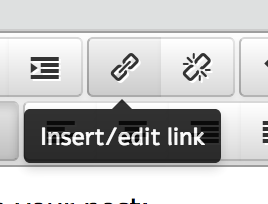
EDIT: To add a website link without creating linked text as described above, simply copy the site's URL from your browser's location bar and paste it into your forum post editor. It will automatically be truncated and hyperlinked!
Tripawds Founders Jim and Rene
tripawds.com | tripawds.org | bemoredog.net | triday.pet
6:27 pm
Team Tripawds
Administrators
24 September 2009
Offline
Unfortunately, SimpleForum does not allow the insertion of the "mailto:" command in the Link URL field to hide an email address. We appologize for this inconvenience.
Simply type an email address in your post (i.e.; address@domain.com) and it will automatically become a link that will launch the user's default email client software. Or better yet, send a Private Message using your Inbox button.
Tripawds Founders Jim and Rene
tripawds.com | tripawds.org | bemoredog.net | triday.pet
1:47 pm

I am trying to follow these instructions- but I don't see anything that looks like step #3: Click the Insert / Edit Link button (Simple Forum Link Tool)
Where are the buttons? What am I missing??
Karen
3:05 pm
Team Tripawds
Administrators
24 September 2009
Offline
krun15 said:
I am trying to follow these instructions...
First off, let's confirm you're talking about forum posts. Here in the forums, when starting a topic or posting a reply there should be a row of icons directly above the text editing box. Select the text you want to be the link, and the two link tools will highlight. These look like little chain links, one whole and one broken. Roll over them and they will become orange. Click the whole link icon and the Insert/Edit Link windo will pop up. Clicking the borken link icon, will remove any existing highlighted link.
If you do not see these icons, your default text editor has been changed. Simply visit your Forum Profile and click the Personal Options tab. Ensure that Rich text (Tiny MCE) is selected and click Update Profile. return to your post editor and notice the differemce. See these complete instructions for changing your default editor for more information.
Now, if you are talking about adding text links in your blog posts... the steps are exactly the same, but the highlight color is different. And you cannot change the post editor in your blog dashboard. Hope this clears things up!
Tripawds Founders Jim and Rene
tripawds.com | tripawds.org | bemoredog.net | triday.pet
11:54 pm

2 January 2010
Offline
Is there a new trick to this using our newly updated forums? I don't see an insert hyperlink button. I just posted a couple of topics that I wanted to link to each other, preferably by turning parts of an existing sentence into a clickable link as opposed to pasting long address link below it. How do I do that with our new format?
9:32 pm

14 August 2009
Offline
John,
I don't remember how it was before because I usually do html's manually.
BUT if you'll type the words you want to have the link and then go back and highlight that text with your mouse, the icon for making links will be enabled. (it's the chain looking icon) Click the icon and the window will then pop open and you can add your URL.
Let me know if that wasn't clear.
 Comet - 1999 to 2011
She departed us unexpectedly January 23, 2011 at the age of 12 1/2.
She was born with a deformed front leg and a tripawd all of her life.
2:58 pm
Team Tripawds
Administrators
24 September 2009
Offline
Comet is correct. The chain icon for linking is still there, none of the tools are different. Keep in mind that a word has to be highlighted before you can link it to something.
Tripawds Founders Jim and Rene
tripawds.com | tripawds.org | bemoredog.net | triday.pet
8:31 pm


Moderators

Helpline Hosts

Bucketeers
22 February 2013
Offline
Just practicing...Testing something....gonna try and link another post to herehttp://tripawds.....t/#p196373
Just making some notes to ask abput later
Okay...either says "none" or "new wi dow"....nothing says "same window"
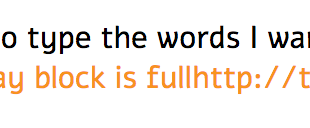
Do not see TITLE FIELD to type the words I want to "hyperlink" Is TEXT TO DISPLAY same as TITLE FIELD. Hmmmm....text to display block is fullhttps://tripawds.com/forums/technical-support/how-to-add-link-on-tavlet/#p196373
Gonna hit reply and see what happens....
Happy Hannah had a glorious additional bonus time of over one yr & two months after amp for osteo! She made me laugh everyday! Joined April's Angels after send off meal of steak, ice cream, M&Ms & deer poop!
8:54 pm
Team Tripawds
Administrators
24 September 2009
Offline
benny55 said
Just practicing...Testing something....
Well done! 
Okay...either says "none" or "new wi dow"....nothing says "same window"
Disregard. Any and all links within forum pages will open in a new window, regardless of the setting...unless you really know your HTML.
Do not see TITLE FIELD to type the words I want to "hyperlink" Is TEXT TO DISPLAY same as TITLE FIELD...
No, there is no longer a Title field. That isn't used anymore. Sorry, the TinyMCE has matured over the years since this topic was first started.
Basically, the only thing you need to be concerned about when adding "hyperlnked" text, is to add the link in the URL field if following the original instructions. Any words you add in the Text to Display field will replace your highlighted words.
So, in a sense, you have discovered another way to "embed" links in forum posts:
- Click or tap Insert Link button (chain link icon).
- Enter URL
- Enter Text to Display.
- Click OK.
Regardless, it is important to ensure that a space is added before and after the anchor text (aka: text to display) for the link. Otherwise you may end up with odd redirects, or unexpected links, like so...
Tripawds Founders Jim and Rene
tripawds.com | tripawds.org | bemoredog.net | triday.pet
1 Guest(s)
